Can your business survive AI?
For many Small and Mid-size Enterprises (SMEs), Big Tech's business solutions are literally overkill. Big Tech's natural targets are large corporations, but for SMEs their endless line-up of subscription modules and user fees are prohibitively expensive and overly complex.
SMEs get the leftovers, dumbed-down big business solutions, but without an IT department to sort out the ridiculous.
But why isn't it simple? SME managers are experts in their field. They already model their businesses with forms and reports, and they can represent their entire business in spreadsheets. Why not use this knowledge to allow managers to build their own custom management systems?
Without AI and without knowledge of IT:
Sumer enables managers to apply their existing knowledge to build their own integrated management systems.
All information required to model a business has been sitting in every SME's forms, reports, and spreadsheets for decades. And yet, seriously, no one in Big Tech ever thought about this?
Fact is, Big Tech could have delivered something like Sumer 20 years ago, but they didn't want to.
Four appropriate technologies
Money is no object
If you have deep pockets, and if you think maybe you will be the next big thing, going with a subscription module system like SalesForce, NetSuite, or Odoo could be easy. Add modules as you go. Of course, this can get expensive after a while as you pay for each new module and new user.
And keep in mind that despite the ads, your software supplier is not "your business partner" out to solve your management problems. Unless you are a high-roller, their mission is to solve only enough of your problem that they can repeatedly tempt you back to buy their next module.
Technology is no object
If you are tech-savvy and understand how to structure a relational database, you can use AI, no-code and low-code platforms, and vibe-coding to build your own system.
Some people do this for a hobby. If you are already managing a business full-time, however, becoming an IT pro could be like serious overtime.
Excited about AI
An AI query "Write a proposal for small business management software that is cheaper and easier than existing Big Tech solutions" returned suggestions for a product called "OmniCore" that "integrates CRM, project tracking, and core finances into one intuitive, drag-and-drop workspace. Priced at a flat $49/month per organization, it eliminates hidden per-user fees and complex onboarding."
It sounds wonderful and certainly nails the issues with current solutions, except for the problems
- it uses built-in AI assistants to allow employees to immediately transition from setup to active use in under 60 minutes, and
- it does not actually exist.
If it did exist, however, asking "what are possible problems with using an AI based small business management system?" brings up serious drawbacks. Structural issues could cause serious liabilities, but worse is that current AI is cheap because it is subsidized—this can't last. Cost increases could soon make any solution depending on AI unusably expensive.
Inexpensive, simple, functional
But if all you really want to do is run your business, if you already have forms and reports, and you can use spreadsheets, and you want to cause the least disruption to you systems, think about Sumer.
It about HI, not AI
HI is Human Intelligence, and SME managers have lots of it. You know what your business should do; there is no reason to let some programmers—who have never run a business in their lives—dictate how you should do things.
The essential technology that gives programmers the advantage is the relational database*. Programmers know how to build them and SME managers don't. The unequal relationship creates a cartel forcing managers to buy back their own systems that they created in the first place.
But SME managers could build a complete management system for themselves—if they had a tool like Sumer.
* What is a relational database?
Relational databases are essential, but unless you are a programmer the details are not important. 'Relational database' just means a collection of data tables—price lists, inventory, sales invoices, accounting, etc.—all logically 'related' or linked.
Modular business packages are based on typical relational database schemes plus forms and reports. SME subscribers need to fit their business into one of the existing packages.
When you purchase a new module you might be adding new database tables and links, or you might just be adding new forms and reports that allow you more access your existing tables.
But surprisingly, you as an SME manager already have a relational database; it is virtual and intuitive and it is in your head. You already know how your data fits together; these are the 'relations' or links needed for a relational database.
With that information, Sumer can build a physical relational database automatically based on your spreadsheets, no need for IT experts to get involved.
How it works
Never mind the database; Sumer builds that automatially behind the scenes. (And yes, Big Tech knows exactly how to do it, they just don't want you to do it.)
So let's concentrate on your existing forms and reports. We need to get our existing data into Sumer. Here is an example. The template behind this Price List is almost self-explanatory.
- Column names across the top, parameters down the left side. You probably recognize most of them.
- Add new columns—anything you want—with the 'AddColumn' button.
- Set DataType, Width, Alignment and so on. You can even add Filters and Formulas.
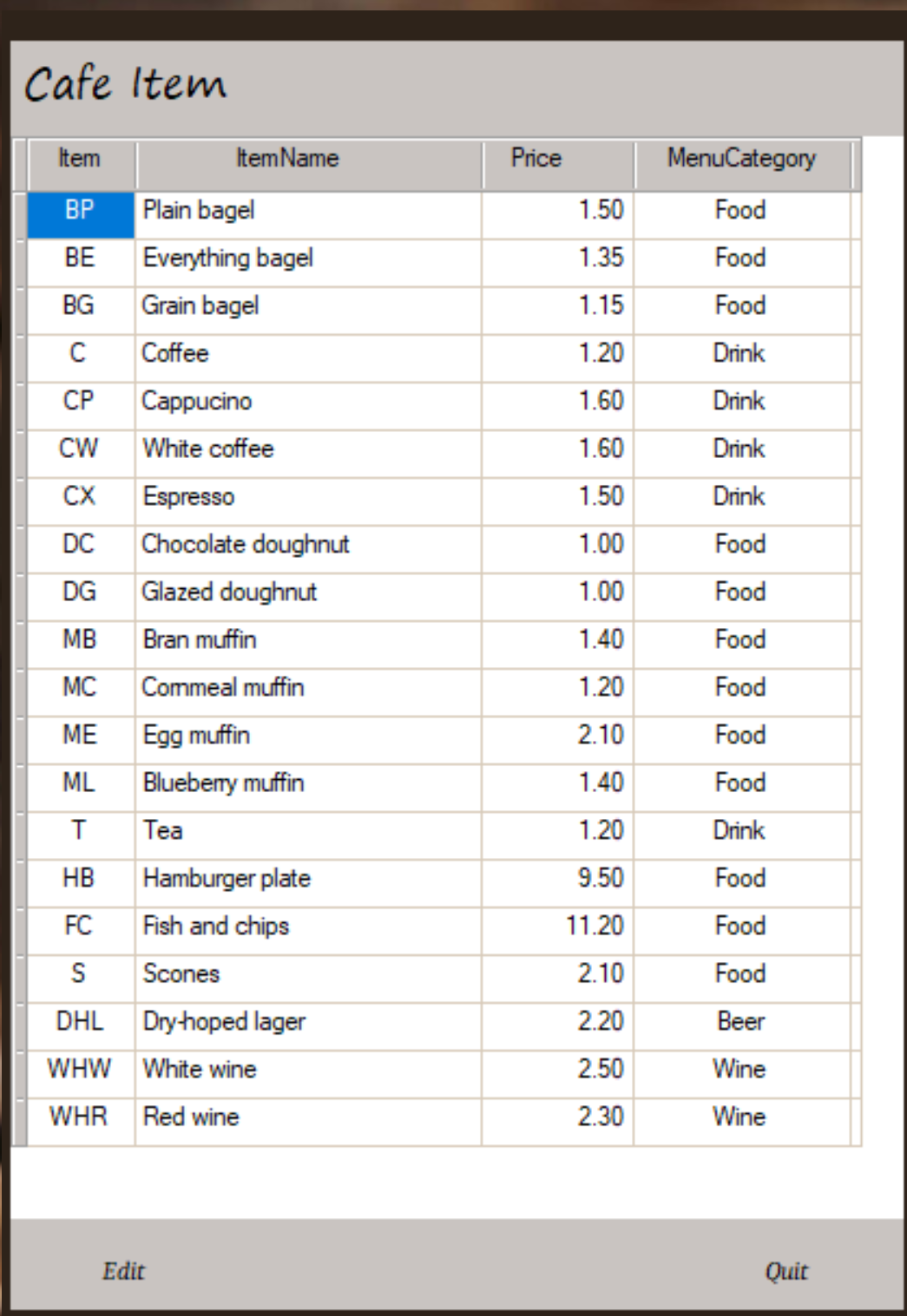
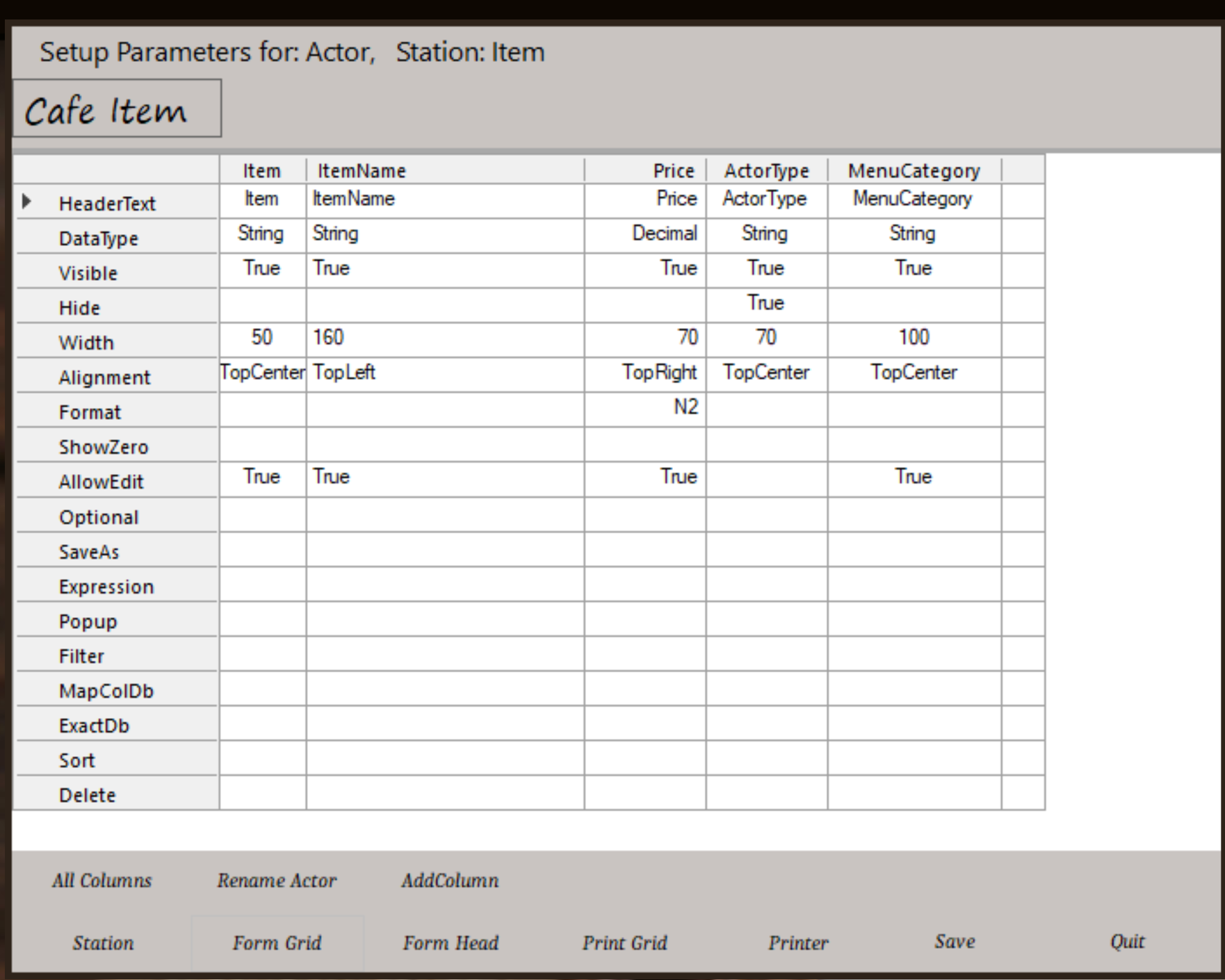
You can fill the data with Copy and Paste if you already have it in a form or spreadsheet.
This price list can be recalled and used automatically in sales entry forms and reports.
Other forms for purchasing, production, sales, scheduling, and more have additional parameters, but all work the same way.
Linking is easy
Linking is the whole point of relational databases. This Cafe Sales Invoice demonstrates how easily Sumer links and posts data.
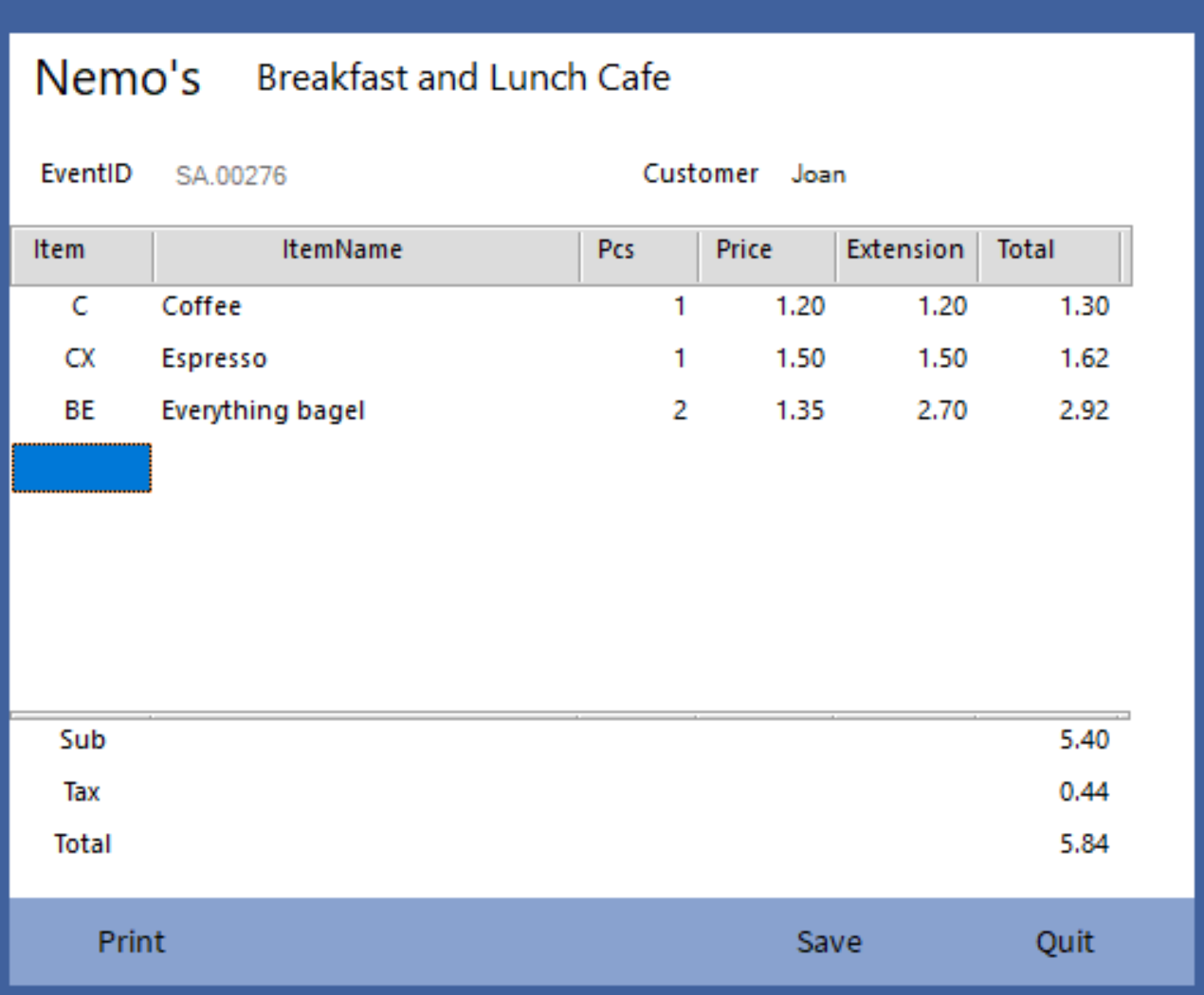
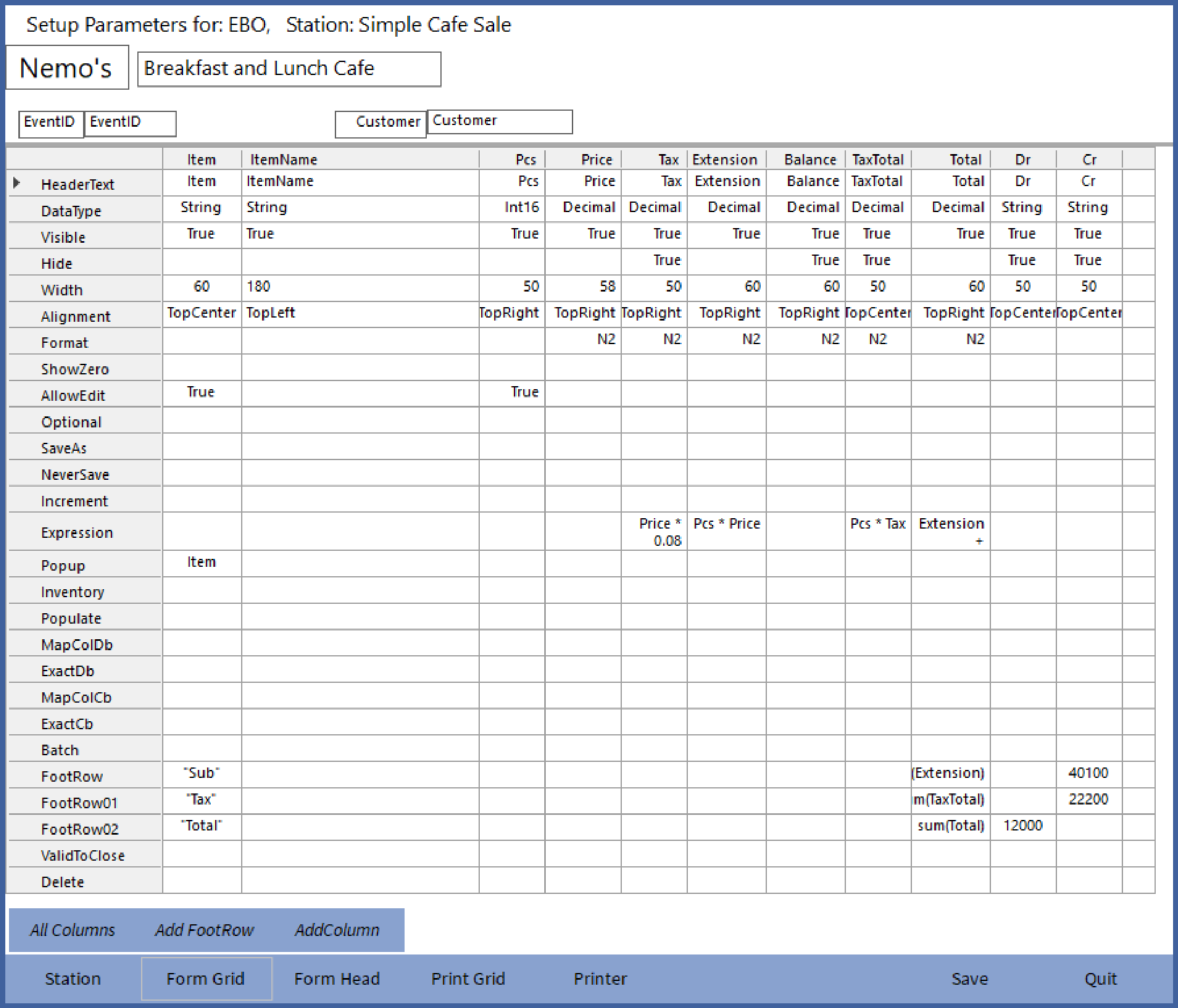
It's probably as easy to figure this out by looking at the template as reading this explanation, but here goes:
- All the columns are created with 'AddColumn' in the template.
- Columns with working information can be set to Hide, just as in spreadsheets.
- Columns 'Item' and 'Pcs' are set to 'AllowEdit'. All other columns come from the Price List or Expressions.
- The Expressions row can include formulas.
- The 'Item' column links the Popup row to 'Item', which is the name of the Price List we created earlier. This all it takes to tell Sumer to look up 'ItemName' and 'Price' from Price List.
- The FootRows set up Sub, Tax, and Total with formulas. The columns 'Dr' and 'Cr' instruct Sumer to post these totals to accounts 40100, 33300, and 12000 in the Sales Journal. If you don't yet have a Sales Journal, leave it off; you can add it later.
- The button 'Form Head' opens up the header panel for editing where we can link another Popup for 'Customer'.
Basically, that is it.
Hundreds of templates like this are already available in the Library so you can pull them into your business—free—and customize them however you like.